
Turn cancellations into opportunities with ThriveCart’s win-back Retention Offers. When customers attempt to cancel their subscription, our intelligent subscription retention system presents them with personalized alternatives: plan downgrades, subscription pauses, or exclusive discounts, giving you a second chance to keep their business. With performance-based pricing, you only pay when our cancellation recovery technology actually saves your subscription revenue, making it a risk-free way to reduce churn and maximize customer lifetime value.
What Are Retention Offers?
Retention offers are alternatives presented to customers when they attempt to cancel their ongoing subscription within the Customer Hub or Learn Student Portal. Instead of immediately processing the cancellation, customers see a customizable modal with one retention offer alongside the option to continue canceling.
Available Offer Types
You can configure one of the following offer types per pricing option:
| Offer Type | Description | Customer Experience |
| Plan Downgrade | Switch to a lower-priced plan | One-click downgrade with no new payment info required |
| Subscription Pause | Delay next billing date | Push billing back 1, 2, or 3 cycles; access continues during pause |
| Discount Coupon | Apply discount to existing plan | Recurring or one-time coupon applied to next billing cycle |
| Cancel Immediately | Proceed with cancellation | Always available as fallback option |
How the Customer Experience Works
Step-by-Step Flow
- Customer clicks “Cancel” in Customer Hub or Learn Portal
- Retention modal appears with your configured offer and custom messaging
- Customer sees two clear options:
- [Accept Offer] – Apply the retention offer to their subscription
- [Continue to Cancel] – Proceed with cancellation
- If offer accepted → Subscription is modified immediately (downgrade, pause, or discount applied)
- If declined → Cancellation proceeds normally
Important Compliance Note
The cancellation button is always visible alongside retention offers to comply with FTC Click-to-Cancel regulations. Customers can always proceed directly to cancellation without accepting the offer.
How to Configure Retention Offers
Setting Up Your Retention Offer
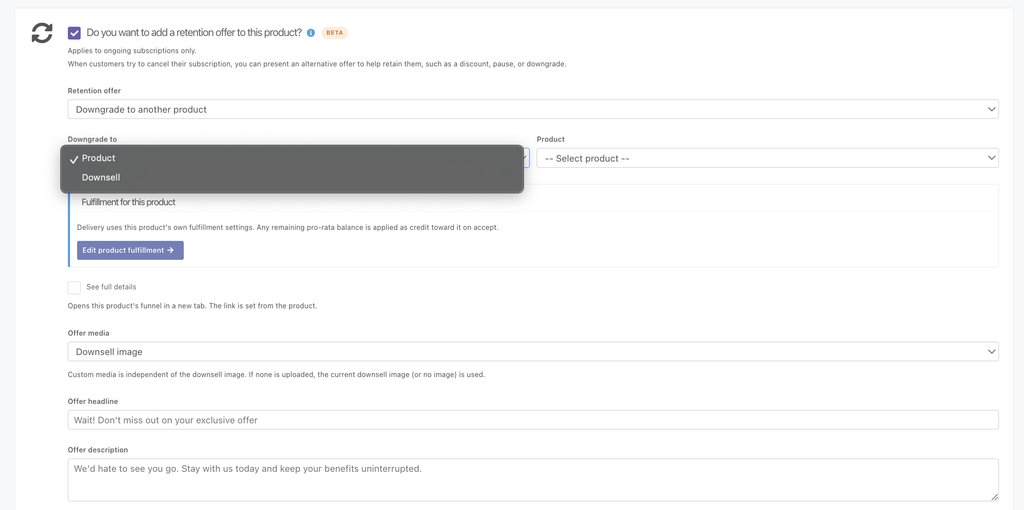
- Navigate to the Pricing tab for your subscription product
- Enable the “Do you want to add a retention offer to this product?” option
- Select ONE offer type from the dropdown:
- Downgrade: Choose from your active main products or downsell products to offer as a downgrade offer
- Pause: Pauses their currently subscription for a set duration (1-3 months)
- Discount: Select from active coupons for this product, or create a new one for the this product only
- or select Cancel immediately (no offer).
- Add your offer’s headline, description and select the media that you want to appear in the retention modal.
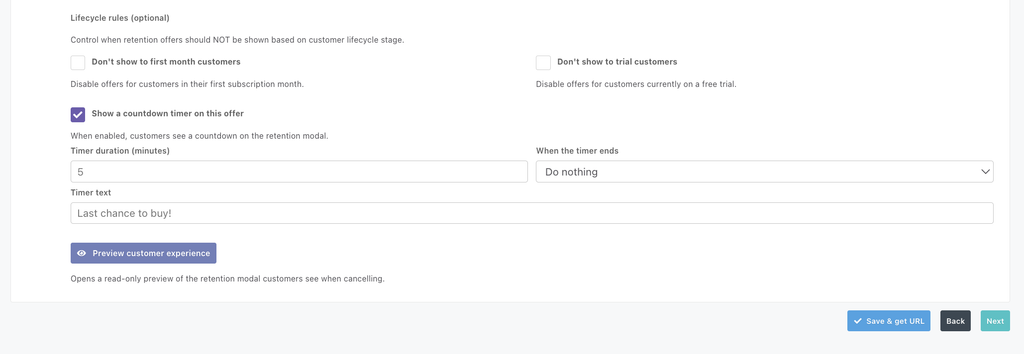
- Optional: Set Lifecycle options, you can:
- Control when retention offers should NOT be shown based on customer lifecycle stage.
- Disable offers for customers in their first subscription month.
- Disable offers for customers currently on a free trial.
- When enabled, customers see a countdown on the retention modal.
- Optional: Enable a countdown timer and configure how long the timer lasts, and what happens when the timer runs out.
- Set your timer duration in minutes
- If “Do nothing” is selected for when the timer ends, the offer is still available and the customer can still select it. If “close the offer” is selected, the offer will be considered expired and the customer can only cancel their subscription.
- Preview your offer to see what your offer will look like to the customer
- Save your overall product
Configuration Options
Downgrade Settings:
- Select target from any existing and active main products, or downsell funnel products (A downsell offer can be created beforehand by heading to Products > Downsells)
- Uses existing payment method (no new card required)
- Pro-rata credits applied to the initial monthly downsell subscription amount automatically
- Note: Pro-rate amounts above and beyond the initial monthly downsell amount are not applied to additional recurring payments
- Customer charged immediately with pro rata calculations deducted from the initial subscription/payment price
- Set Fulfillment method – Clicking “edit downsell fulfillment” will direct you to your downsells fulfillment settings page, where you can optionally set a unique fulfillment method for your downsell offer
- Main products linked as a downgrade offer will use the products existing fulfillment setup
- Revoke options on the original product fulfillment apply based on original product setup: immediately OR at end of term
Pause Settings:
- Choose pause duration: 1, 2, or 3 cycles
- Reschedules next billing date with payment processor
- Customer access continues during pause (configurable)
Important notes:
- Pause applies to next billing cycle only
- You can cancel a subscription if a customer attempts to cancel again while paused.
Discount Settings:
- Select from active coupons configured for this product, or create a new one within the setup modal
- Discount applies to the next billing cycle only
- Can be recurring (if the coupon is configured to apply to all future recurring payments) or a one-time discount
- Coupon must be active at time of offer acceptance
- If coupon expires, retention offer is automatically disabled
The Customer Experience
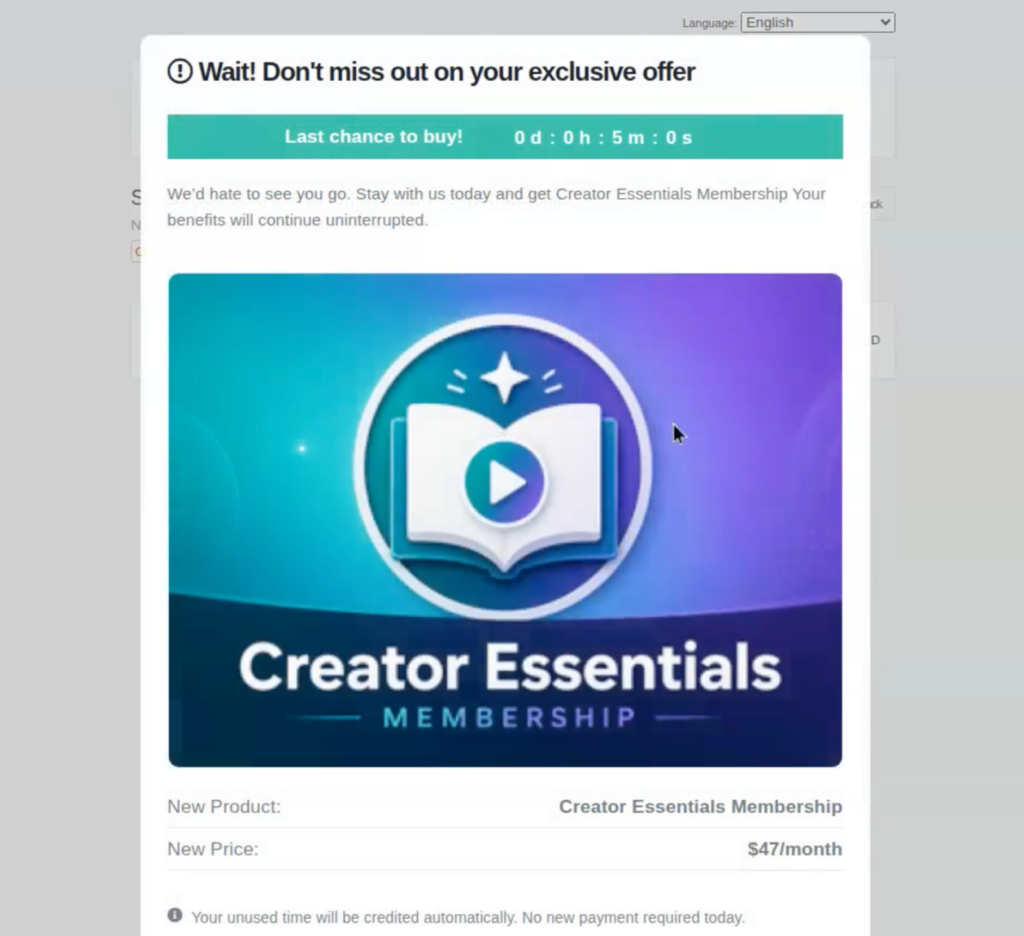
Within the Customer Hub, customers can view their subscription and when clicking “Cancel” the offer will populate in a modal with a countdown timer, if enabled.
Downgrades:
If the customer accepts a downgrade offer for a new product, the transaction will proceed as a purchase of the new product, with a pro-rated adjustment to the purchase of the new subscription. If the pro-rated amount is more than the initial payment for the downgrade product, the remaining amount gets added as a credit to the customer’s Stripe profile which can be used for next rebills.
They will then see the new active offer in their hub, with their old subscription product cancelled.
Discounts:
When a discount offer is shown, there is a pricing breakdown showing the discount amount and the next billing price, detailing that the discount applies only to the next billing amount and not the entire subscription.
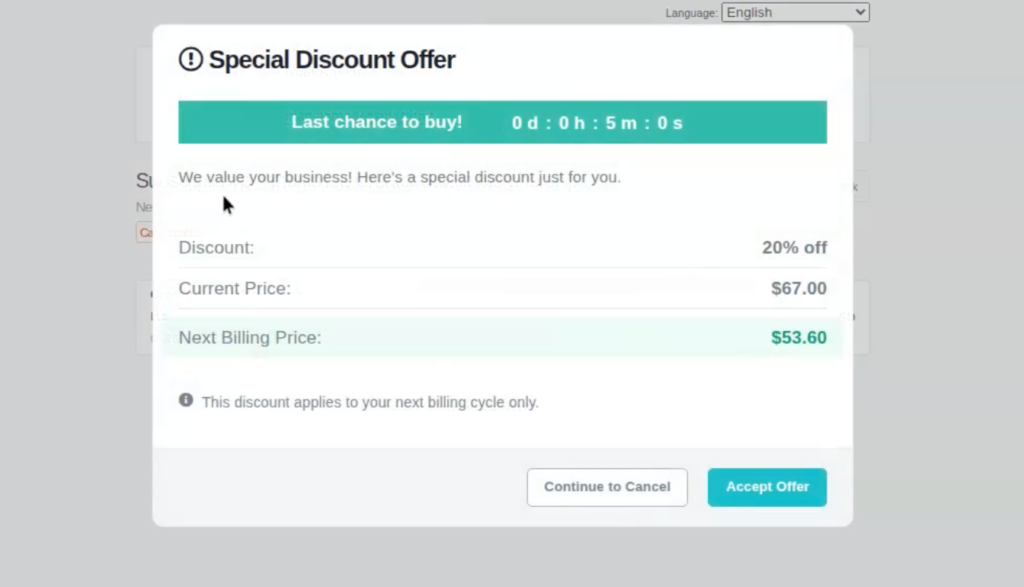
So if the current price was $67, but your retention offer is a 20% discount, the customer’s next billing amount will be $53.
If the subscription is monthly, that means they pay $53 on their next billing date, but then $67 again the next month and into the future.
Pauses:
When a pause offer is shown, it will show the configured # of months to the customer that you’ve set in your product settings. The breakdown shows their current next billing date, followed by the proposed new billing date if they accept the pause.
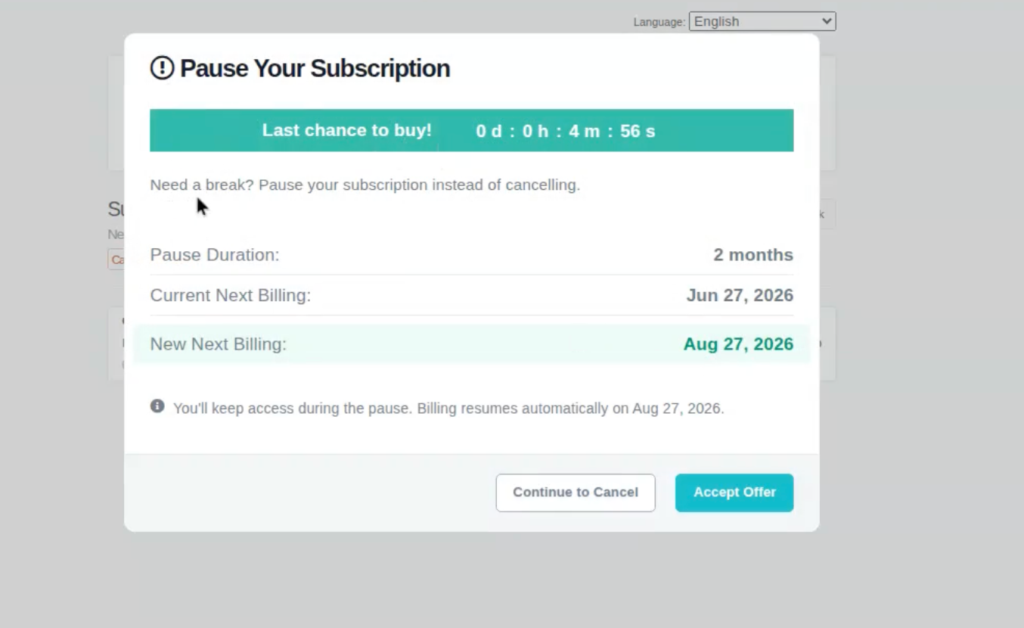
Accepting the pause adjusts their next subscription billing date seen on their subscription.
Performance-Based Billing (Automation Fees)
You only pay a percentage of the revenue we help you recover. This means you pay nothing unless the feature actually saves subscription revenue.
Fee Structure
The below fees are only charged on the first recovered payment, based on your specific plan level. Fees are not applied to the entire remaining subscription.
- Lifetime Standard and Pro+ accounts: 8% of first recovered revenue
- Standard Subscription accounts: 5% of first recovered revenue
- Pro+ subscription accounts: 0%
These are subject to change, but up-to-date processing fees can always be found on our page here.
What Counts as “Recovered Revenue”?
Fees are triggered by:
- ✅ Plan downgrades accepted through retention flow
- ✅ Discounted renewals accepted through retention flow
- ✅ Credit or usage offers accepted through retention flow
- ✅ Any successful billing after accepting a retention offer
Fees are NOT triggered by:
- ❌ Failed payment recovery / dunning processes
- ❌ Cart abandonment recovery
- ❌ Involuntary churn recovery (expired cards, etc.)
- ❌ Pause → Resume (unless customer accepts retention offer again)
How Recovered Revenue is Calculated
| Offer Type | Example | Gross Recovered Revenue |
| Plan Downgrade | $100/month → $50/month | $50 (new plan price) |
| Discount Coupon | 20% off $100 plan | $80 (discounted price) |
| Subscription Pause | 2-month pause | $0 during pause; recorded when first billing occurs after pause ends |
When You’re Billed
ThriveCart fees are charged when the customer actually pays their recovered subscription billing. Only the first payment after the save is charged a fee, not all future recurring payments in the subscription.
Note on refunds: If a refund is processed after a downgrade, ThriveCart’s recovery fee is retained and not reversed. This aligns with Stripe’s own policy of not refunding processing fees on refunded transactions.
Dashboard & Reporting
Within your transactions dashboard, a customer who accepted a downgrade offer will have 3 transactions showing:
- Their original purchase
- The cancellation transaction for their original subscription (always shown as a $0.00 transaction)
- The new transaction for their new subscription
A discounted offer will only adjust the existing subscription. The next billing date with the original price will be crossed out, with their upcoming payment discounted to the new amount.
A paused offer will simply show the customers subscription as paused, with the resume date detailed on that transaction.
New Statistic: Recovered Revenue
When viewing your ThriveCart dashboard, any recovered revenue will be shown in this new analytics section. Within this section are three stats:
- MRR won back (gross) – the total value of any recovered subscriptions on a monthly basis
- ARR won back (gross) – the total value of any recovered subscriptions on a yearly basis
- Win back rate – the percentage of offers accepted calculated as a percentage based on the number of accepted offers shown (Accepted Offers ÷ Cancel Button Clicks × 100)
Automatic Safeguards & Limitations
Auto-Disable Scenarios
Retention offers are automatically disabled when:
| Scenario | What Happens |
| Downgrade product is unpublished | Offer automatically disabled until product is republished |
| Selected coupon expires | Offer automatically disabled until new coupon is selected |
| Customer has an active contract | Offer never displays (ThrivePay Installments, Split Pay, limited rebills) |
Contract Safeguards
Retention offers will NOT trigger if:
- Customer is on ThrivePay Installments
- Customer is on Split Pay
- Customer has limited subscription rebills remaining
These contracts use existing downgrade logic that doesn’t prorate or stop contracted payments.
Compliance & Regulations
FTC Click-to-Cancel Compliance
This feature complies with US Federal Trade Commission Click-to-Cancel regulations:
✓ Cancel button always appears simultaneously with retention offers
✓ Customers can proceed directly to cancellation without accepting offers
✓ No hidden steps or additional barriers to cancellation
✓ Clear, transparent options presented
Edge Cases & Special Scenarios
Subscriber Pauses Then Resumes
Handling: Counts as separate recovered billing events only if the retention offer triggers again when they attempt to cancel after resuming.
Subscriber Upgrades Mid-Billing Window
Handling: Fees apply only if retention logic was triggered. Standard upgrades don’t trigger retention fees.
Partial Refunds or Discounts
Handling: Fees are prorated based on the recovered revenue actually paid by the customer.
Subscription Cancels After Recovery
Handling: No retroactive adjustments. Once the recovered billing event occurs and the fee is charged, this fee is non-refundable.
Frequently Asked Questions
- Q: How many retention offers can I show to a single customer?
- A: Only one offer per product, but customers with multiple product subscriptions may see an offer per subscription. You select which offer type (downgrade, pause, or discount) to present in your Product Pricing settings.
- A: Only one offer per product, but customers with multiple product subscriptions may see an offer per subscription. You select which offer type (downgrade, pause, or discount) to present in your Product Pricing settings.
- Q: Can a customer receive multiple retention offers over time?
- A: Yes. If a customer tries to cancel again in the future and the retention flow triggers again, they may see another offer. Fees apply for each acceptance according to the billing rules.
- A: Yes. If a customer tries to cancel again in the future and the retention flow triggers again, they may see another offer. Fees apply for each acceptance according to the billing rules.
- Q: What happens if I unpublish my downgrade product?
- A: The retention offer is automatically disabled until you republish the product or select a different downgrade option.
- A: The retention offer is automatically disabled until you republish the product or select a different downgrade option.
- Q: When do I get charged the ThriveCart recovery fee?
- A: On the invoice closest to the save event: when the customer actually pays their next recovered billing cycle.
- A: On the invoice closest to the save event: when the customer actually pays their next recovered billing cycle.
- Q: Does this work with PayPal subscriptions?
- A: Yes. The feature uses the customer’s existing payment method (Stripe or PayPal), so no new card information is required.
- A: Yes. The feature uses the customer’s existing payment method (Stripe or PayPal), so no new card information is required.
- Q: Can I exclude customers in their first month or free trial?
- A: Yes. There’s a checkbox option in the Retention Offers settings to disable offers for first-month customers or those in free trials.
- A: Yes. There’s a checkbox option in the Retention Offers settings to disable offers for first-month customers or those in free trials.
- Q: What if a customer has multiple subscriptions? Can they get different offers?
- A: Yes. Each subscription product has its own retention offer configuration, so different products can present different offers.
- A: Yes. Each subscription product has its own retention offer configuration, so different products can present different offers.
- Q: Do fees continue if a customer cancels after accepting a retention offer?
- A: No retroactive adjustments are made. Once the recovered billing event occurs and the fee is charged, it’s earned by ThriveCart even if the customer later cancels.
- A: No retroactive adjustments are made. Once the recovered billing event occurs and the fee is charged, it’s earned by ThriveCart even if the customer later cancels.
- Q: Can I customize the messaging in the retention modal?
- A: Yes. You can write custom “Save” copy in the Retention Offers configuration that appears in the modal alongside the offer.
- A: Yes. You can write custom “Save” copy in the Retention Offers configuration that appears in the modal alongside the offer.
- Q: What if a customer is already paused and tries to cancel?
- A: If the subscription is already paused (seller pause or any Stripe pause), the customer can still see the retention offer modal. What happens on accepting the offer, depends on the offer type. They can dismiss the modal and cancel normally if acceptance fails.
- Pause offer: Acceptance fails. Error: Failed to pause subscription: You cannot create a new invoice for a paused subscription. Unpause the subscription before attempting to create a new invoice.
- Downgrade offer: Acceptance fails. Error: No active subscription found for this order
- Discount offer: Acceptance succeeds. The discount is applied to the next scheduled payment after the pause ends.
- A: If the subscription is already paused (seller pause or any Stripe pause), the customer can still see the retention offer modal. What happens on accepting the offer, depends on the offer type. They can dismiss the modal and cancel normally if acceptance fails.