
EU legislation requires that any online seller conducting B2C transactions with European consumers offer a standardized electronic withdrawal button. This gives consumers the legal right to withdraw from a contract as easily as they made it.
ThriveCart has built a fully compliant, two-stage withdrawal flow directly into the Customer Hub and checkout infrastructure compliant with both EU and German Widerrufsbutton directives . You can enable it per product in your dashboard, and we strongly recommend you do so: Failing to comply to German Legislation specifically extends the statutory withdrawal window from 14 days to 12 months + 14 days automatically, and non-compliance can result in fines up to EUR 50,000 or 4% of annual global turnover.
Important Notes
- This withdrawal button is available on products purchased through Stripe Connect+ and PayPal Enhanced only
- You will need to accept ThriveCart’s Terms and Conditions during setup
- This feature applies to any merchant selling B2C to consumers throughout the EU, regardless of your own account country
- Digital sellers can opt to include a withdrawal waiver checkbox directly on the checkout page, detailing that immediate product access is granted after purchase and that acceptance of the checkbox acknowledges that they are waiving their right of withdrawal
What is the Withdrawal Button?
The button is a legally mandated two-stage electronic flow that allows EU consumers (B2C only) to revoke a purchase contract within 14 days without requiring a reason.
ThriveCart’s implementation:
- Displays a button in the Customer Hub for eligible orders (subscriptions)
- Auto-hides the button once the 14-day window has elapsed
- Collects only the three required fields: full name, order ID, and email
- Transaction is added to your Withdrawal view where you can review, and then process full or partial refunds
- Sends a legally compliant confirmation email to both buyer and merchant within 5 seconds
- Maintains an immutable audit log for every withdrawal event
Quick Setup
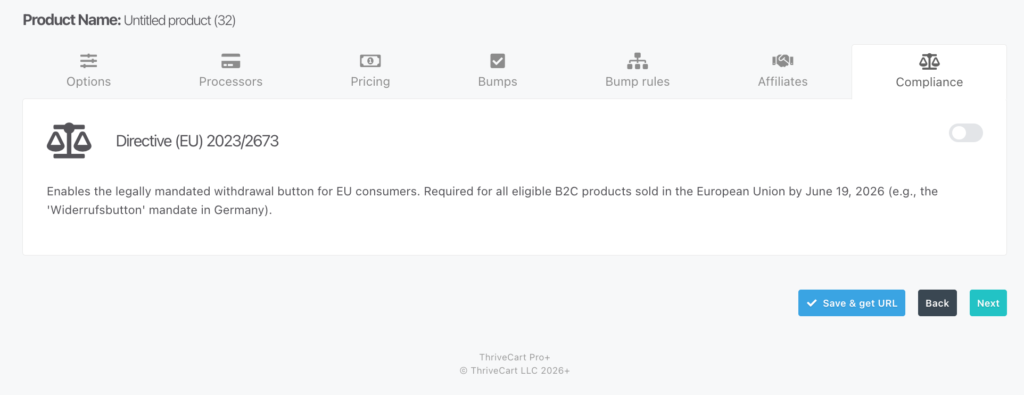
- Log into your ThriveCart dashboard > edit Product > navigate to the Compliance tab, and enable the Directive on for each applicable product.
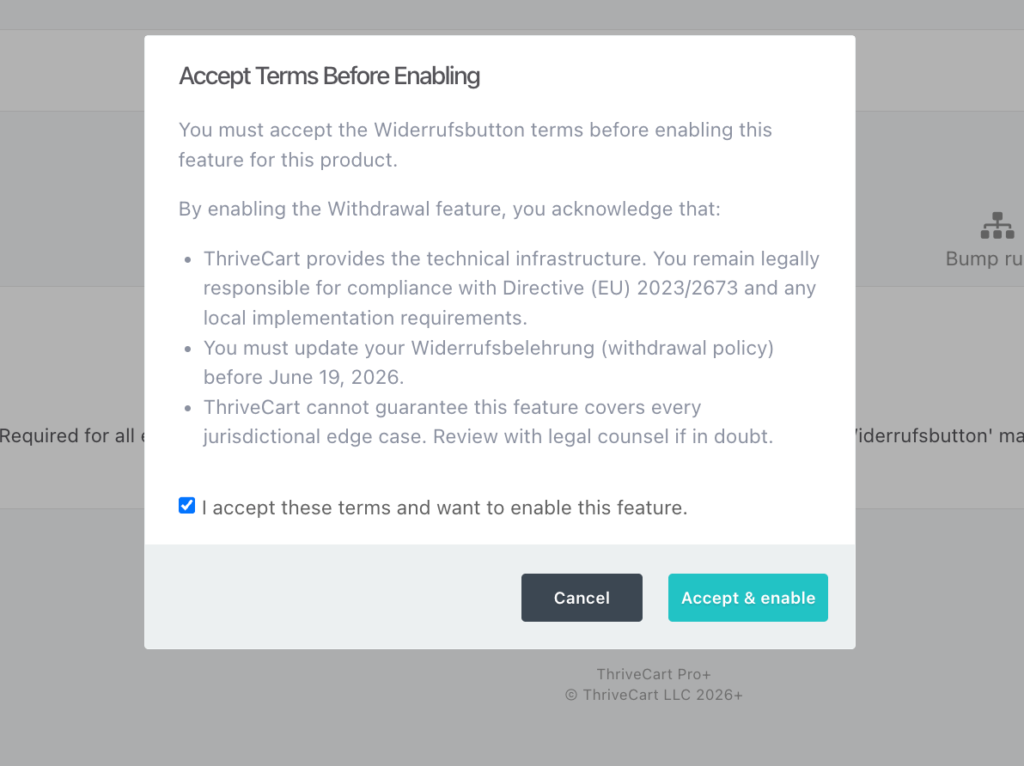
- Review and accept ThriveCart’s Terms and Conditions when prompted. This is required before the feature is activated.
Configuring Settings
Enable the toggle per product
The Directive toggle is available in the Compliance section of each product’s settings. It defaults to OFF for all products. Toggle it ON for every product you sell to EU consumers.
When enabling, you will see the terms and conditions regarding this functionality, these must be accepted in order to enable the feature.
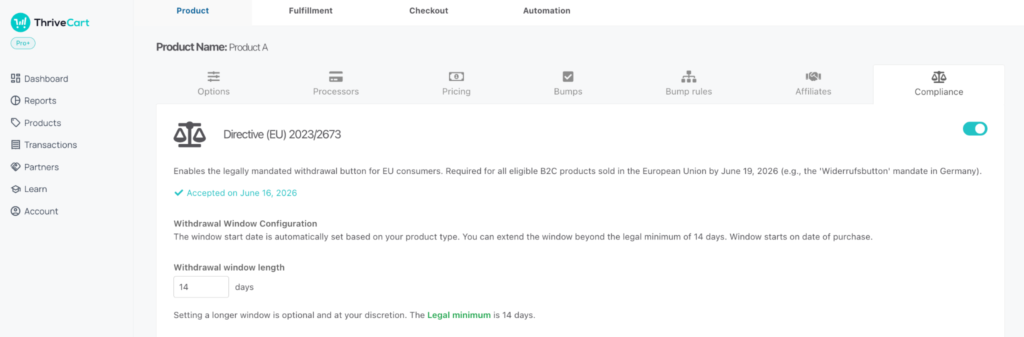
Set the withdrawal window start date
You must configure your window length.This window is automatically set based on your product type:
- Digital goods, courses, memberships, or SaaS: The legal minimum is 14 days
- Physical goods: The legal minimum is set to 14 days from purchase by default, but this can be adjusted based on your typical delivery timelines
Digital content waiver checkboxes at checkout
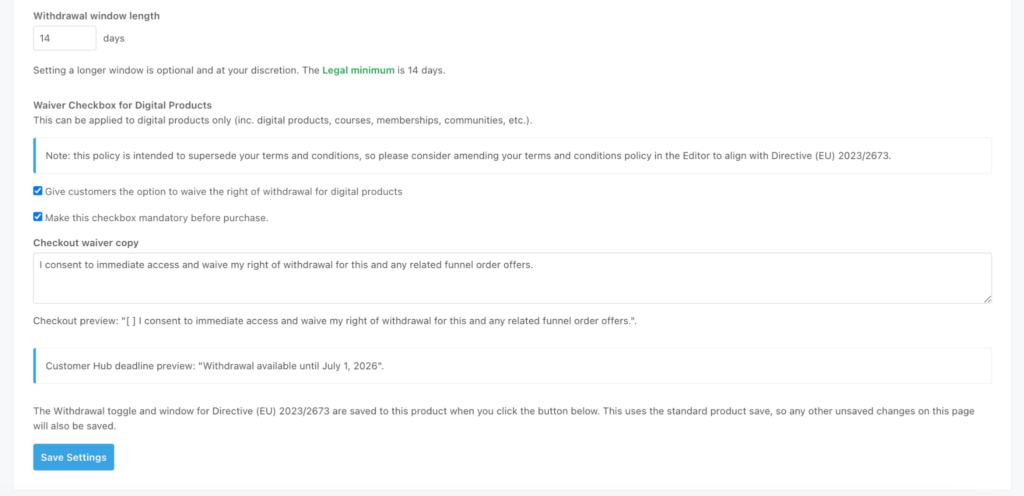
For digital products where access begins immediately, you can enable a separate consent checkbox at checkout. These allow you to legally establish that the consumer knowingly waived their withdrawal right once access began.
To enable the digital waiver, you will want to check the box “Give customers the option to waive the right of withdrawal for digital products”
To make this checkbox mandatory (preventing purchase if they do not accept), check the box to “Make the checkbox mandatory”
You can then set the copy for that checkbox – explaining briefly that they are agreeing to purchase and accept that their right of withdrawal is removed when purchasing your digital product.
When customers accept this digital product waiver, the checkbox text, version ID, submission timestamp, and IP metadata are all recorded to your order audit log.
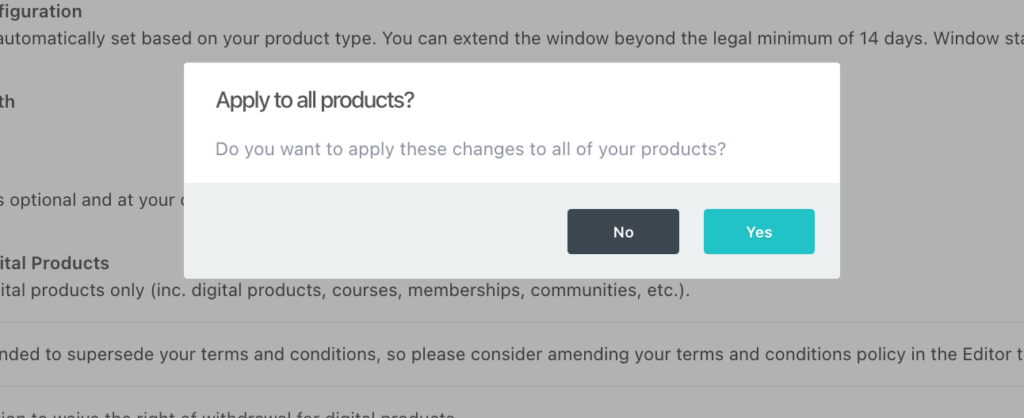
Once you’re satisfied with your setup and wording, click “Save Settings” and a popup will ask if you would like to apply the compliance settings to all of your products. Click “yes” to easily enable this on all products across your account.
Who is identified as an EU consumer?
ThriveCart automatically detects B2C buyers using the following logic:
- Primary: Billing address country = European Union
- Fallback: IP address (when no billing address is configured)
- Exclusions: Buyers who enter a VAT number (B2B) or enter a business name and business address
Disable selling within the EU
If you are not wanting to offer withdrawal rights to European customers for any reason, even with the digital product waiver in checkout (detailed above), then in order to remain compliant we would recommend that you disable selling to European customers.
To do this, you can opt to set location restriction options within your pricing option setup.
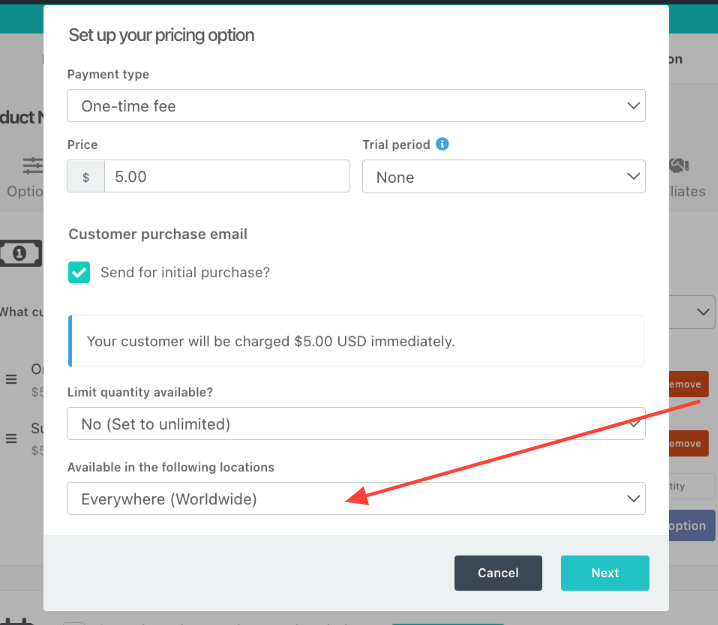
You can see more on that setup in our guide: How to Prevent Purchases from Restricted Countries.
Disabling the feature after launch
If you turn off the Directive toggle for a product after submissions have already been made, all existing withdrawal records are retained. No new submissions will be accepted for that product going forward.
Terms and conditions
- ThriveCart provides the technical infrastructure. You remain legally responsible for compliance with Directive (EU) 2023/2673 and any local implementation requirements.
- These directives came into effect on June 19, 2026.
- ThriveCart does not guarantee that this feature covers every judicial edge case. Review with legal counsel if in doubt.
Non-EU merchants
If your account country is not set to a country within the European Union but you sell to European consumers, you can manually opt in to the feature from your product settings.
Customer Experience
When the button is enabled for a product, here is what your European buyers will see:
In Checkout:
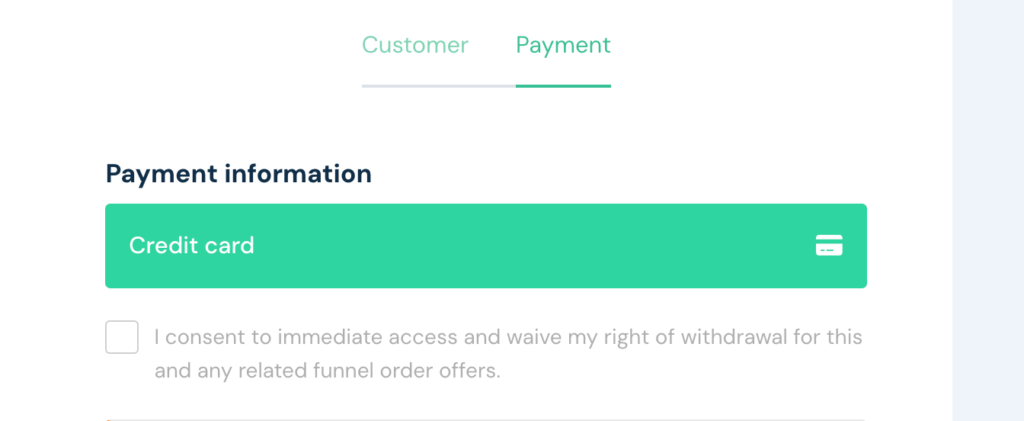
- When enabled, your digital content checkbox prompts customers to check the box directly within the checkout process.
In the Customer Hub:
- They log into the Customer Hub and open an order for that product.
- Login requires that they click the link from the bottom of their invoice, enter their email, and click the link that is emailed to them. No passwords required.
- If the order is within your set window, they see a withdrawal button alongside a deadline notice (e.g., “Withdrawal available until July 2, 2026”)
- The button does not appear once the window has passed. There are no retention offers, exit pop-ups, or cancellation-discouragement patterns on the withdrawal form.
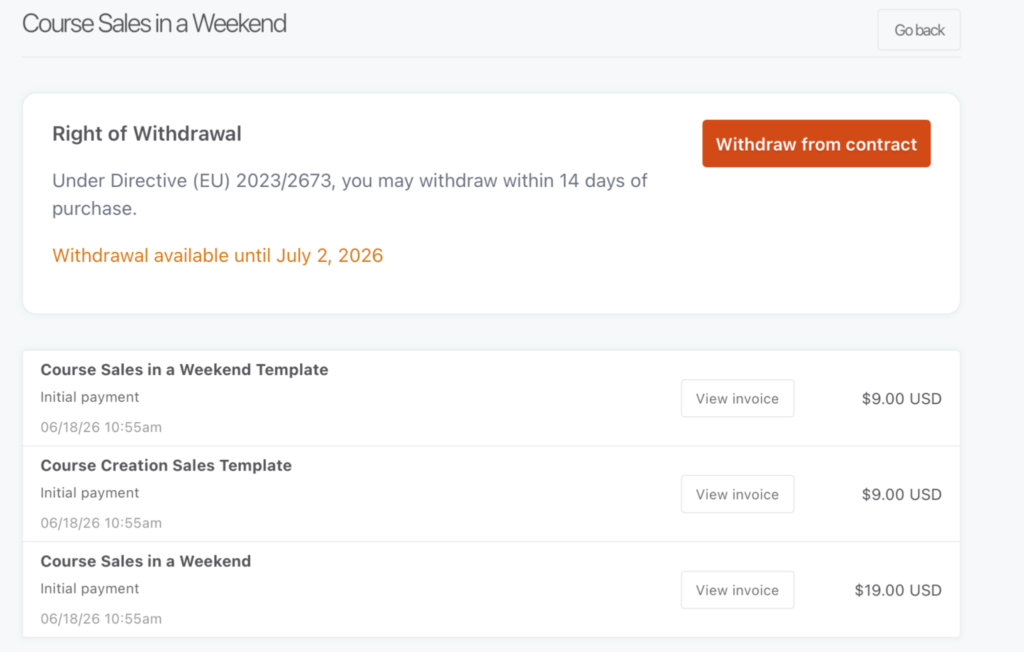
- Clicking the button takes them directly to the Stage 2 confirmation form, pre-filled with their full name, Order ID, and email.
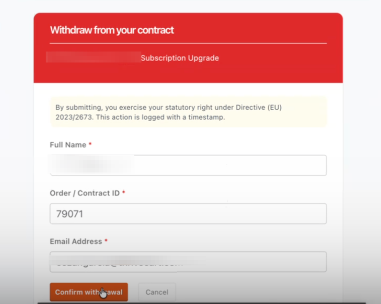
- They click to confirm.
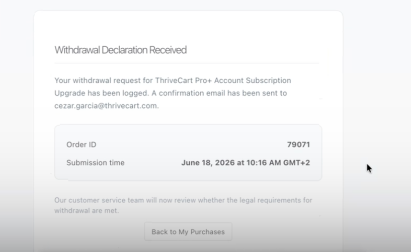
- They immediately see a success screen confirming receipt, and receive a confirmation email within 5 seconds.
The Withdrawal Email
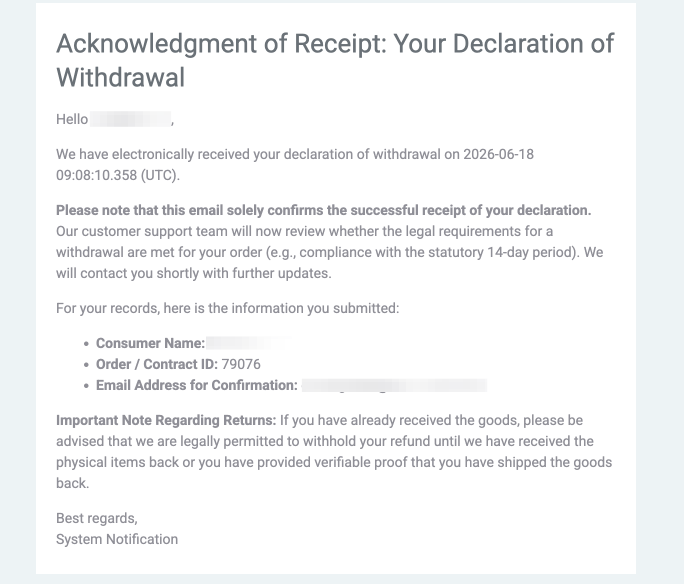
An email is sent to the customer immediately after they have submitted their withdrawal request, with the below details:
Subject: Acknowledgment of Receipt: Your Declaration of Withdrawal
Sent from: notifications@thrivecart.email
Body:
Hello [customer name],
We have electronically received your declaration of withdrawal on 2026-06-18 09:08:10.358 (UTC).
Please note that this email solely confirms the successful receipt of your declaration. Our customer support team will now review whether the legal requirements for a withdrawal are met for your order (e.g., compliance with the statutory 14-day period). We will contact you shortly with further updates.
For your records, here is the information you submitted:
- Consumer Name: [customer name]
- Order / Contract ID: 79076
- Email Address for Confirmation: [customer email]
Important Note Regarding Returns: If you have already received the goods, please be advised that we are legally permitted to withhold your refund until we have received the physical items back or you have provided verifiable proof that you have shipped the goods back.
Best regards,
System Notification
The Withdrawal Dashboard
You, as the merchant, will receive an email alert for every completed withdrawal. ThriveCart does not automatically refund those transactions for you, and you will want to review and confirm whether to refund or reject a withdrawal submission.
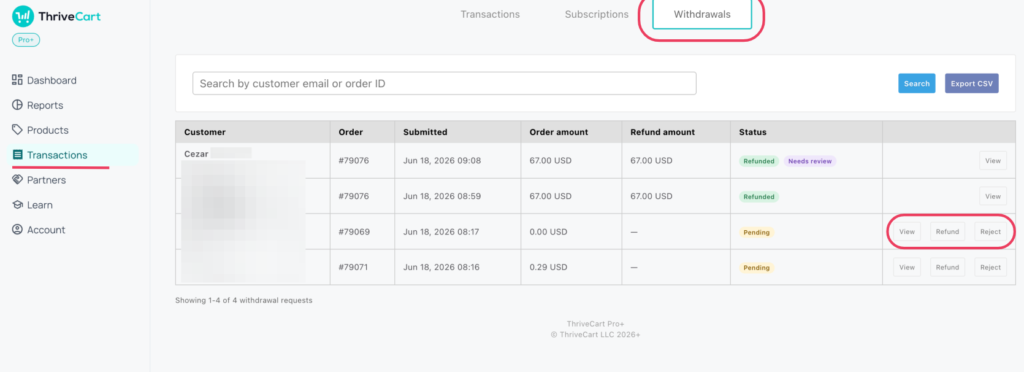
Viewing Withdrawal Requests shows all submissions with submission timestamp, customer name, email, Invoice number, window status, and refund status – with the ability to then action full or partial refunds. You can search and export all records as a CSV for audit purposes in the top right hand side.
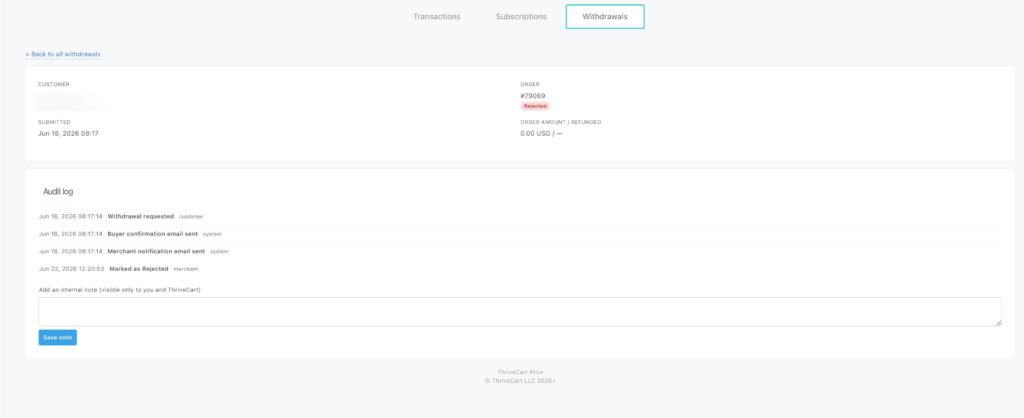
When clicking in to “View” a Withdrawal request, you’ll have more details about the timestamps for all events related to that withdrawal as well as see the ability to add notes to the withdrawal requests:
FAQs
- Q: Is this feature the same as my existing subscription cancellation button?
- A: No, and they must never be combined. The right to withdrawal is a statutory right to withdraw from a contract within 14 days. It is governed by § 356a BGB (Germany) and Directive (EU) 2023/2673. Subscription cancellation is a separate legal concept. Combining them into a single flow risks non-compliance regardless of the button’s presence.
- Q: Does this apply to me if my business is not based in the EU?
- A: Yes, if you sell B2C to EU consumers, the law applies to you regardless of where your business is registered. You can manually enable the withdrawal button from any account, not just those with an account country in the European Union.
- Q: Are refunds processed automatically?
- A: No. Withdrawal requests are submitted to you for review within your Withdrawal Transactions dashboard. From there you can decide whether to refund in full or partially. After the window expires, the withdrawal button no longer appears for the customer, and any late requests are handled via the standard cancellation process.