
Live Chat Support is a premium add-on that gives you instant access to real-time support from human ThriveCart specialists. Available for $19/month, this service is designed for creators, coaches, and entrepreneurs who need immediate answers during critical moments—like setting up a new checkout before a launch, troubleshooting an integration, or resolving time-sensitive technical issues.
If you’re new to ThriveCart and haven’t purchased our product yet, you can add Live Chat Support during checkout. Our Live Chat upsell is available after purchasing ThriveCart via our checkout. Purchase either ThriveCart Standard or ThriveCart Pro+, and you will be presented with Live Chat as an upsell offer after the initial checkout.
Unlike email support (which can take a few hours, up to 24), Live Chat connects you with a support agent in under 5 minutes, helping you resolve issues in real-time without interrupting your workflow.
Live chat is available via monthly subscription for ThriveCart customers on any plan level, but is limited to the first 500 customers during our launch phase, so sign up now to reserve your live-chat support spot!
Existing customers can purchase ThriveCart Live chat here:
What’s Included
Live Chat Support provides:
- Human support specialists – Real ThriveCart experts, not bots
- Under 5 minute response times – Connect with an agent quickly when time matters
- Real-time troubleshooting – Get answers while you work, with back-and-forth dialogue
- Priority access – Jump ahead of the email support queue
- Chat transcripts – Automatic email transcript of every conversation
- Secure & authenticated – Pre-authenticated through your logged-in dashboard
- No long-term commitment – Monthly subscription, cancel anytime
Live Chat is ideal for:
✓ Product setup and funnel configuration
✓ Real-time checkout configuration and troubleshooting
✓ Payment gateway setup (Stripe, PayPal, etc.)
✓ Integration guidance and connection issues
✓ Subscription and billing management questions
✓ Time-sensitive issues
What’s Not Included
Live Chat Support focuses on real-time technical assistance. It does not include:
❌ Immediate bug-fix guarantees – Support does not resolve bugs. Bugs are tracked and resolved by our development team.
❌ Implementation or full setup services. Instead, consider our done-for-you concierge service for full white-glove setup.
❌ Dedicated launch-day monitoring, but we can help you prepare beforehand.
❌ Strategic consulting or funnel advice. Use our Knowledge Base and Community for business guidance.
How It Works
For users with active subscriptions, Live Chat will be a contact option available within the ThriveIQ chatbot when logged into your dashboard:
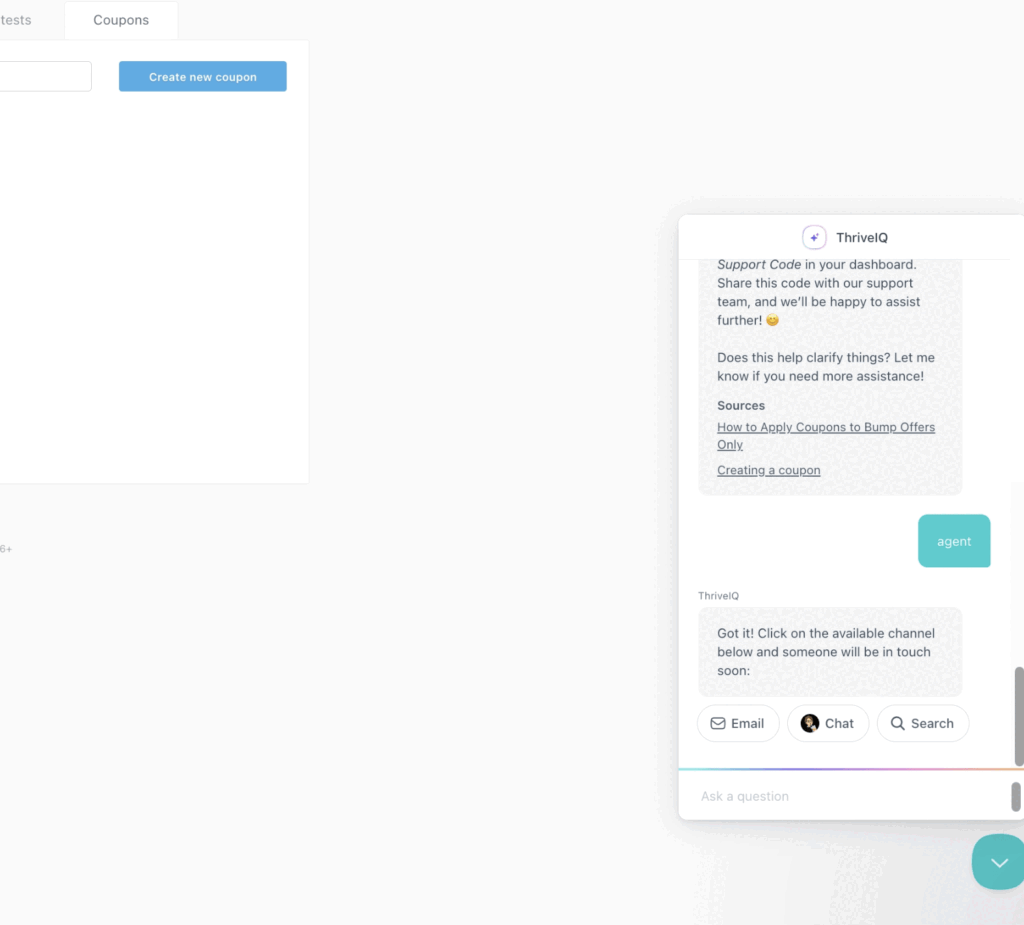
Step 1: Subscribe to Live Chat Support. New customers will see the $19/month subscription option as an upsell option as part of their purchase flow (purchase ThriveCart here), existing customers can purchase the add-on here.
Step 2: Access the ThriveIQ Chat Widget to start a chat
- Describe your issue or question to connect to ThriveIQ
- ThriveIQ (our AI chatbot) will share resources and responses to help address your issue
- If you need additional guidance beyond what ThriveIQ is providing, you can respond as such in the chat, and the option to contact support will be presented
- You’ll see options to either submit an email or start a live chat
- Click the chat icon in the ThriveIQ widget
- Connect with a support agent within 5 minutes
- Converse with a support agent for real-time help and troubleshooting
Step 3: Receive Your Transcript
After your chat ends, you’ll automatically receive an email transcript for your records.
Important Notes:
- The “chat” option within the ThriveIQ conversation is only visible to customers with an active Live Chat subscription.
- You must be logged into your ThriveCart dashboard to access Live Chat
- If all agents are busy when you reach out, your message will be saved and converted to an email ticket (nothing gets lost)
How Live Chat Fits Into ThriveCart Support
ThriveCart offers a complete support ecosystem designed to meet you wherever you are:
- Live Chat Support (Premium add on, $19/month) – Real-time human support for urgent issues
- Dedicated Slack Channel Support (Premium add on, $499/month) – Direct contact with a Technical Account Manager for every aspect of your business. More details here.
- Email Support (Included) – Comprehensive help for non-urgent questions and detailed investigations
- ThriveIQ AI Assistant (Included) – Instant answers to common questions
- Knowledge Base (Included) – Comprehensive self-service documentation and tutorials
- ThriveCart Academy Community (Included) – Peer support, business guidance, and best practices via our Facebook group
Each channel serves a different purpose, and you can use them together based on your needs.
Frequently Asked Questions (FAQ’s)
- Q: Can I still use ThriveIQ if I subscribe to Live Chat?
- A: Absolutely! ThriveIQ remains available to all ThriveCart customers for free. Live Chat is an additional premium option for when you need real-time human assistance.
- Q: What hours is Live Chat available?
- A: Live Chat operates 24/7/365. If agents are currently helping other customers, you can still access support via email or ThriveIQ for immediate automated assistance. Check the chat widget for real-time availability.
- Q: What happens if all agents are busy?
- A: If all agents are occupied when you reach out, your message will be automatically saved and converted to an email ticket. We’ll prioritize your request and respond as quickly as possible.
- Q: Can I use Live Chat for business strategy questions?
- A: Live Chat focuses on technical support and troubleshooting. For strategic guidance on funnels, pricing, or marketing, we recommend exploring our Knowledge Base and engaging with the ThriveCart Academy Community.
- Q: What if my issue requires developer attention?
- A: If your issue is related to a known bug or requires back-end investigation, we’ll escalate it to our development team and follow up with you via email with progress updates.
- Q: How do I cancel my Live Chat subscription?
- A: You can cancel your Live Chat subscription anytime by logging into the ThriveCart Customer Hub (found here). There are no long-term commitments.
- Q: Is the initial 500-customer limit still in effect?
- A: During the initial launch phase, access is limited to ensure the highest quality support. If you’re interested, we recommend subscribing early to secure your spot.