
Give your customers more flexibility and choice with ThriveCart’s Split-pay pricing option.
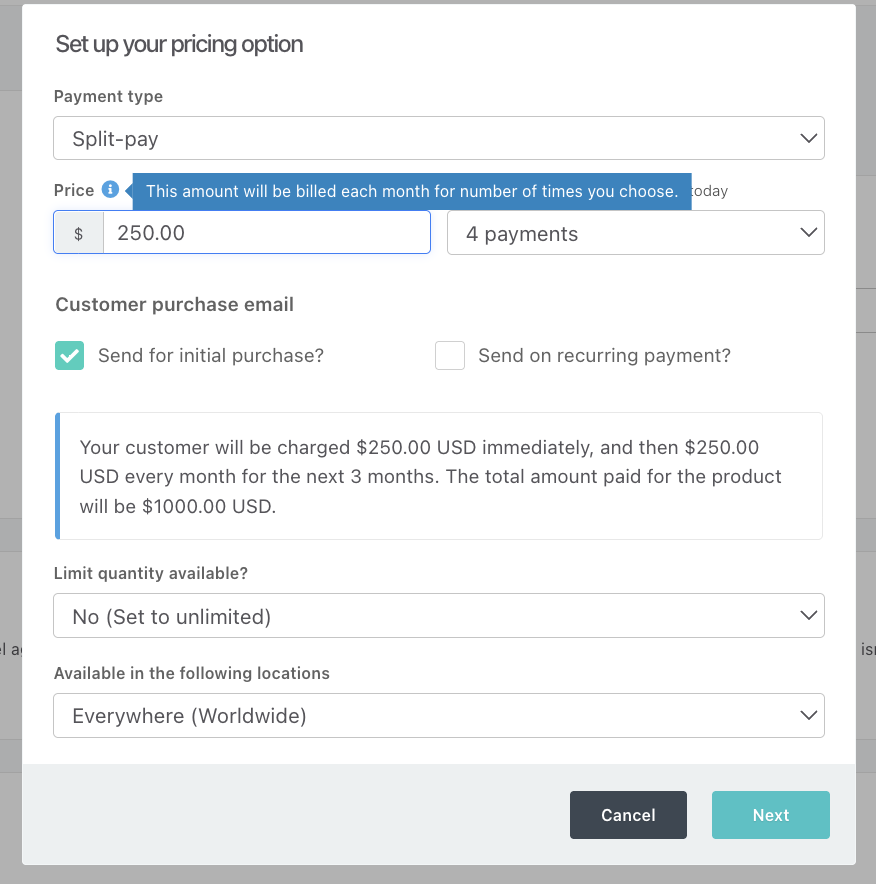
How to set up Split Pay
- Edit or create a product, then go to Product > Pricing.
- Click + Add pricing option.
- In Payment type, select Split-pay and set the amount to be paid at each installment.
- Choose 2, 3, 4, 5, or 6 payments. Each payment uses the same amount as the initial payment.
- Click Next, customize the pricing option name (this will be shown on invoices), then click Save.
The Split-pay option will appear at checkout, allowing customers to select it instead of paying in full or choosing another pricing option. See the full pricing options guide for more details.
Split-pay vs. a subscription
Split-pay is best for a simple, fixed-term payment plan that ends after a set number of equal payments. For example, you might offer a one-time course in 3 payments, a coaching package in 4 payments, or an event package in 6 payments. Its main benefit over a limited subscription is faster setup, but it has fewer configuration options.
Use a subscription when payments should continue until the customer cancels, such as for a membership, SaaS product, or ongoing service. Choose a limited subscription instead of Split-pay when you need a custom number of rebills, a trial period, or more control over the payment schedule.
Split Pay Limitations
- Split Pay cannot be setup with a trial period
- Split Pay is always monthly
- The number of recurring payment months available for a Split Pay pricing option are set at 2, 3, 4, 5, or 6.
Split Pay was built to be a quick and simple way to break your one-time pricing option into multiple monthly payments, but if you’re looking for more functionality in your payment plan (such as the ability to set trial times, different initial prices, or custom rebill counts) then consider setting a Subscription (limited) pricing option. See more in our guide on recurring subscriptions.
Consider ThrivePay Installments
Instead of worrying about chasing customers down to complete their Split Pay or subscription payments, consider utilizing ThrivePay Installments for your split payments.
Unlike traditional Split Pay, with ThrivePay Installments you receive the full payout upfront, minus applicable fees.
Eligible customers can split a one-time purchase into 3, 6, or 12 interest-free monthly payments, with no traditional credit check, making it easier for them to opt-in and choose their payment plan length. It is especially useful for high-ticket products where affordability may prevent a purchase. Learn more in What is ThrivePay Installments?