
Bring seasonal flair straight into your checkout experience with holiday checkout customization inside ThriveCart’s cart editor. With just a click, you can apply Enhanced editor overlays—beautiful, pre-designed themes that match major holidays and promotional moments throughout the year.
From festive year-end sales to Valentine’s promos and everything in between, these overlays instantly elevate your branding, create emotional connection, and boost conversions—no design skills needed. Just apply, publish, and let the holiday magic do the rest.
Available Overlays
We’ve already rolled out some fun options, with more on the way:
- Christmas Overlay
- New Year Overlay
- Valentine’s Overlay
- Halloween Overlay
Thanksgiving Overlay
…and many more coming soon!
How to Add an Overlay
It’s quick and easy:
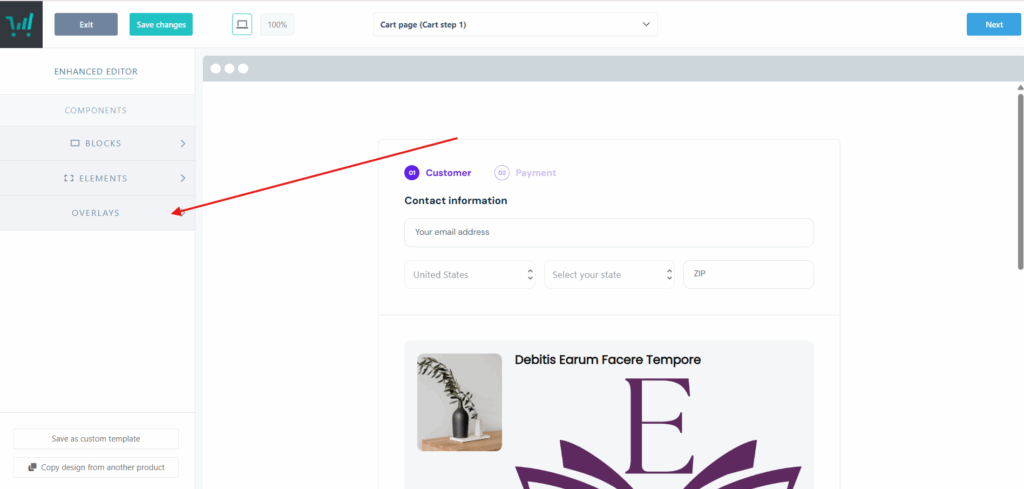
- Open your Enhanced Editor.
- Click Overlays from the menu on the left-hand side.
Toggle on the overlay you’d like to display to apply it to your checkout.
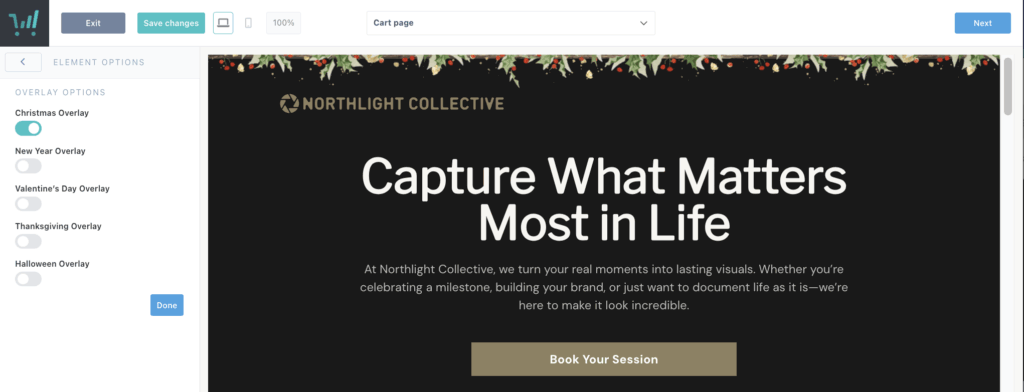
And just like that — your checkout gets a festive upgrade!