
The future of payments is here, and it’s simpler than ever. Expand your reach and offer customers a modern, secure way to pay with ThriveCart Crypto Payments via USDC (USD Coin) or USDP (USD Pax Dollar), available exclusively to users with Stripe Connect+.
This integration allows approved US-based Stripe accounts to accept crypto payments in ThriveCart without the need for wallets, conversions, or blockchain management, making it effortless to tap into a growing market of crypto-friendly buyers.
With instant USD conversion, zero crypto handling, and full Stripe payout compatibility, your business can embrace innovation without the technical hassle. USDC checkout integrations for crypto have been shown to increase conversion rates by up to 7%, particularly among tech-forward and high-LTV customers.
Future-proof your payments and access new markets
As digital currencies gain global adoption, ThriveCart helps your business stay ahead of the curve. Through Stripe Connect+, you can now accept payments in USDC (USD Coin) and USDP (Pax Dollar) across leading blockchain networks—Ethereum, Solana, and Polygon.
This feature gives your customers flexibility and security while ensuring you receive traditional USD payouts automatically.
- No wallet setup required
- No manual conversion needed
- No disruption to your payout schedule
ThriveCart’s integration blends crypto innovation with the simplicity of Stripe, allowing you to expand into new audiences with minimal friction.
What You’ll Need
- A US-based Stripe account with Stripe Connect+ enabled
- Approval from Stripe to activate crypto support
Only one-time payments are currently supported (no subscriptions or trials). Supported tokens are USDC and USDP, with compatibility across the Ethereum, Solana, and Polygon networks.
How It Works for Customers
Crypto payments are processed via Stripe’s LINK wallet system. This ensures security, compliance, and a seamless checkout experience.
Supported Wallets include::
- MetaMask
- Phantom
- Coinbase Wallet
- WalletConnect
Customers complete checkout using their crypto wallet, and Stripe instantly converts the payment to USD and deposits it into your account.
As the vendor, you never handle crypto directly, so there’s no need to manage wallets or conversions on your own.
Requesting Crypto Support & Enabling Payments
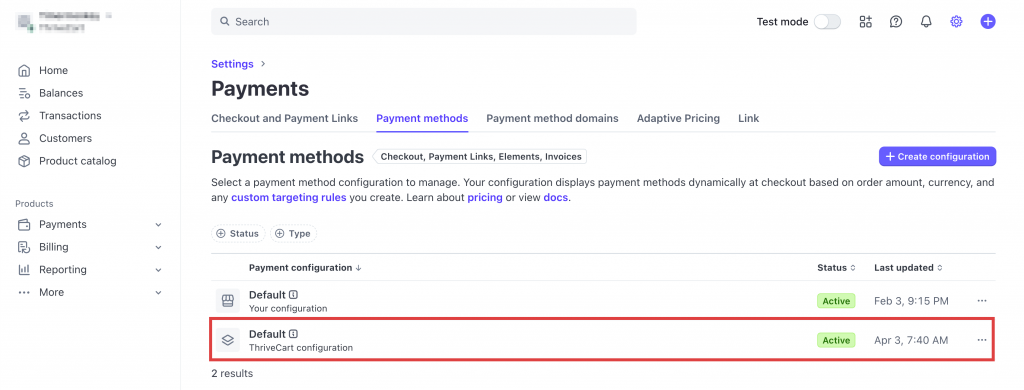
- In your Stripe Connect+ Dashboard, go to Settings → Payments.
- Click the Payment Methods tab.
- Locate the ThriveCart Configuration row and click to open it.
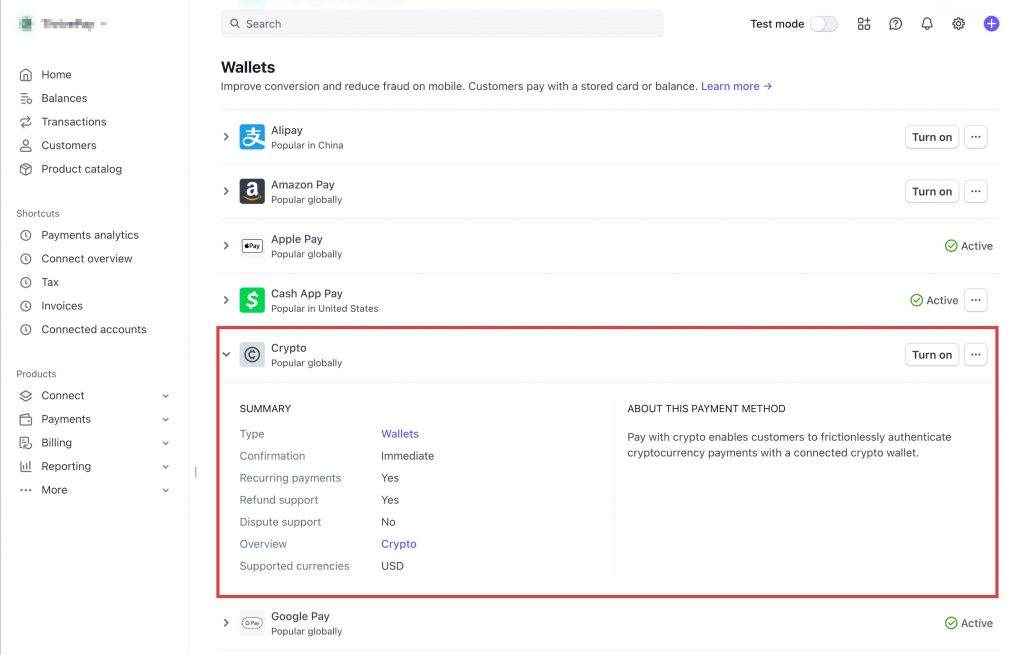
- Scroll down to the Wallets section.
- Find the Crypto option—on the right, click Request or Turn On.
- If you see “Request,” submit your application to Stripe for review.
- If you see “Turn On,” you’ve already been approved and can activate it immediately.
Stripe approval is required. If you don’t see the option, your account may not be eligible. ThriveCart cannot enable this for you—reach out to Stripe Support for questions about access.
Frequently Asked Questions (FAQs)
- Q: Who can use Crypto Payments in ThriveCart?
- A: Crypto payments via USDC/USDP are only available to US-based Stripe Connect+ accounts that have been approved by Stripe for crypto processing.
- Q: Do I need to manage a crypto wallet or deal with conversions?
- A: No. Stripe handles everything from the wallet connection to USD conversion. You never touch crypto. Your business receives standard USD payouts as usual.
- Q: What types of payments are supported?
- A: Only one-time payments are currently supported.
- Q: Which cryptocurrencies and networks are accepted?
- A: These are set by Stripe directly, but the supporting crypto wallets include MetaMask, Phantom, Coinbase Wallet, WalletConnect.
- To set your desired crypto options, log in to Stripe directly, and make sure you’re viewing your Stripe Connect+ account. Navigate to Settings → Payments → Payment Methods to enable/disable your desired options (or request access to submit to Stripe for approval).
- A: These are set by Stripe directly, but the supporting crypto wallets include MetaMask, Phantom, Coinbase Wallet, WalletConnect.